
The register
A lane that sells at full speed with the internet down, and posts the moment it is back.
One application for Windows lanes, Android handhelds, iPads, kitchen displays and kiosks. Every write lands in the register’s own database first, so a cashier never waits for a server, and nothing staged is lost on a network drop, an app kill, a power loss or a reboot.
RUNS ON
Windows 10 and 11 lanesinstaller or MSIX
Android 10+ handheldsAPK or MDM
iPad, iOS 15+Business Manager
Kitchen displays and kioskssame app, a device mode
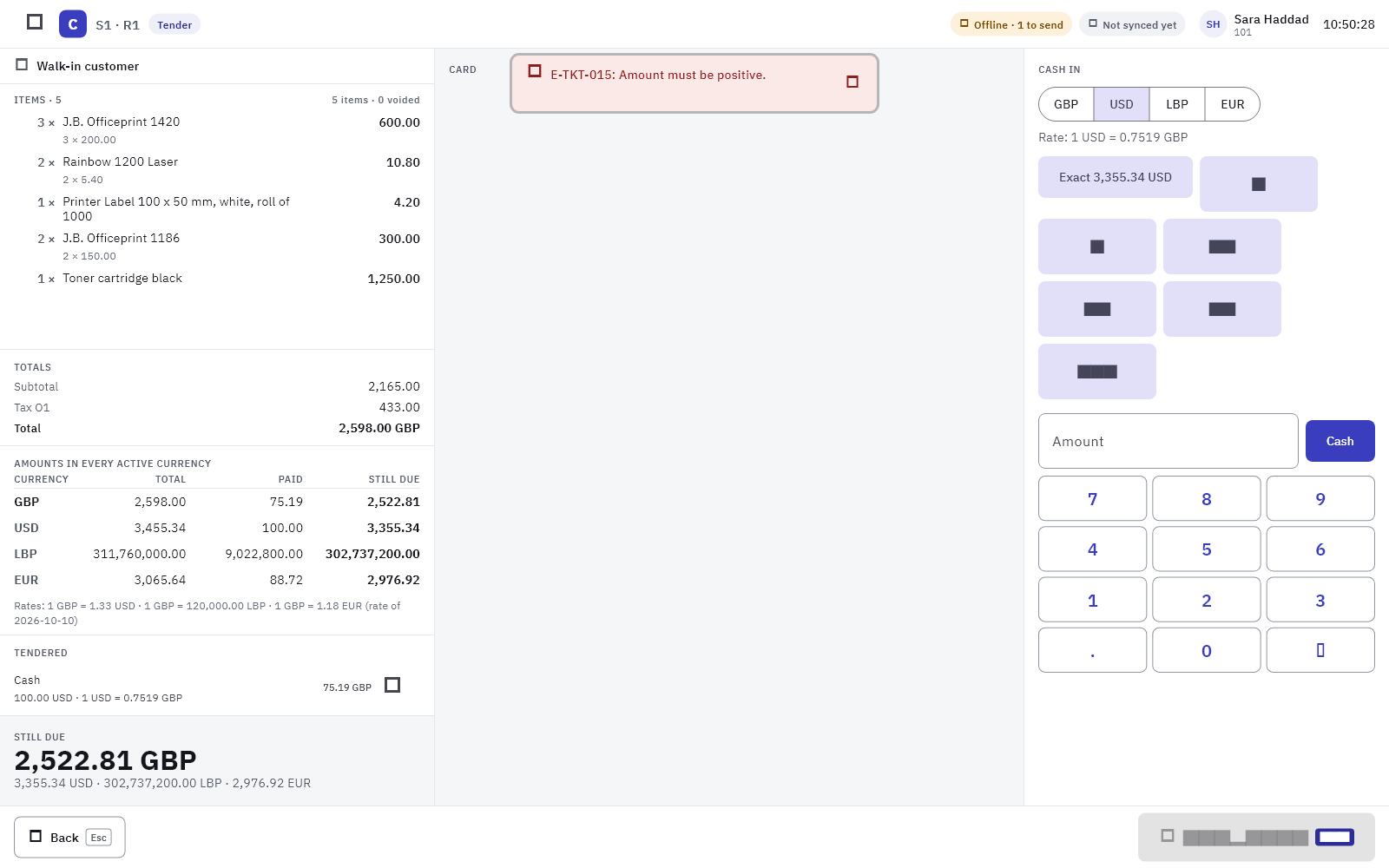
The lane, as drawn
One primary action per screen. Status as words with a colour, never a colour alone.
01
Status barStore and register, the ticket in progress, the customer, connection and sync state, held tickets, the shift and its float, the operator and the clock. Narrow screens drop detail; nothing is ever scaled.
02
Ticket columnEvery line with its quantity, unit price, discount, serial or weight; the totals; the amounts due in every active currency at today’s SAP rate; the tenders taken; the amount still due.
03
Cash panel and action barBanknotes with their pictures per currency, exact, next note, a keypad, the change card; one filled primary button, every other action with its function key on a keycap.
Keyboard-operable lanes
Every lane works without a mouse or a touch screen.
Function keys for the actions, typed wildcards in the item field, Enter to resolve what was typed first and never a stale candidate. The same keys on every register of the company.
Hold ticketF2
RecallF3
ReturnsF4
Cash in / outF6
Void lineF8
ShiftF10
TenderF12
What the register does
Selling, tendering, returning, counting. All of it offline.
Selling
Find any item one wayThe item field matches the code, the name, the foreign name, every barcode and every known serial, ranked, offline. A serial pick adds the line carrying it.
Quick layouts with picturesPages of buttons designed in the portal, with images and colours, per store or register. A repeated scan raises the quantity or adds a line, as you configure.
Guards, not surprisesOpen-price items ask for a price, maximum prices refuse, negative stock warns, blocks or asks for an approval, age-restricted items ask for the ID check.
Units, weights, matricesUnits of measure from SAP, weighed lines from a connected scale or a weight barcode, a colour and size grid for fashion, kits and bundles.
Tendering
Cash in several currenciesThe amount due in every active currency at SAP’s rate for the day, banknotes with pictures, change in the currency the customer wants, exchange journals posted in SAP.
Cards through adaptersTerminal adapters signed off per device, or a standalone mode that records the approval code. Pre-authorisations for bar tabs, captures, refunds, settlement.
Everything else a chain takesCheque, bank transfer per account, on account with a credit check, deposits and down payments, gift cards, store credit, loyalty points, custom tenders with a GL mapping.
Split, partial, tip, signSplit a bill evenly, by seat or by item; take part now and part later; tips tracked or not; a signature captured and attached to the SAP document when your policy asks.
Returns and voids
With or without a receiptLook the ticket up locally, in the store or across the chain; return the lines, choose restock or damaged, refund to the original tender, cash or store credit.
Reasons and approvalsEvery void, return and override carries a reason and, where your policy says so, an approver’s PIN, card or a remote approval from a manager’s phone.
Posted as SAP documentsCredit memos based on the invoice, refunds as outgoing payments, exchanges in one ticket. Reversals are proven live before a build ships.
Cash and the day
Shifts and floatsOpen with a float per currency, count blind or declared, paid in and paid out with financial types, safe drops, over and short posted to the accounts you map.
X, Z and day closeReports on the register and in the portal, a day close that refuses while a shift is open, a summary e-mail, a scheduled day end.
Time clockClock in and out, forced clock-out at close, badges for the lane, labour in the reports.
Drilled against the real failuresEvery outbox-backed flow is tested with the network dropped, the app killed, the power lost and the Service Layer down. The register replays nothing twice and loses nothing staged.
Network dropApp killPower lossRebootSAP downClock skew
Restaurant modeThe same register, a table on the floor plan.Rooms and sections, table states served, seated, reserved and dirty with a word and a colour, owners and take-over, move, merge and split, guests and seats, courses held and fired, kitchen stations with a backup printer, pro-forma, bar tabs on a pre-authorisation.Restaurants and quick service →Handhelds and mobilityLine busting, tableside orders, deliveries.The phone layout of every screen at 360 dp, DataWedge and camera scanning, Bluetooth receipt printers, delivery packages with a handover that collects the balance at the door, a photo and a signature on the SAP delivery note.Showrooms and deliveries →
Peripherals
Hardware behind adapters, signed off per device.
| Device | How | Notes |
|---|---|---|
| Receipt printers | ESC/POS over USB, network or Bluetooth | Arabic as raster, the mark on the receipt, drawer kick |
| Label printers | ZPL and EPL | Item labels at receiving, byte-exact templates |
| Scanners | HID wedge, DataWedge, camera | GS1 application identifiers, weight and price barcodes |
| Scales | Serial or TCP, Mettler Toledo 8217 and line protocols | Weighed lines carry gross, tare and net |
| Payment terminals | ZVT and OPI adapters, standalone mode | Vendor adapters per market, enabled per company after sign-off |
| Customer displays | Second screen, HTTP or a browser on a TV | Cart mirror, promotion images, order-ready board |